What do you need to craft and repair?
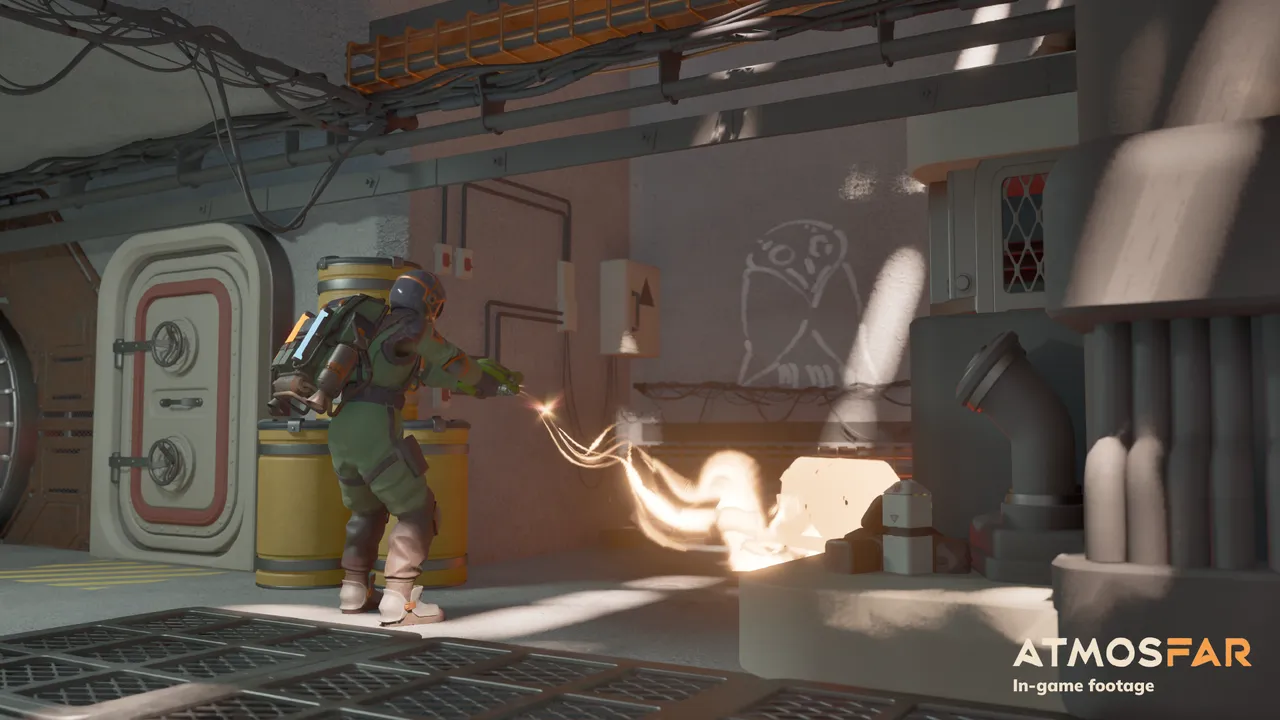
The ATMOSFAR Demo separates gathering, crafting and repair. The extractor recovers materials from salvage; the camp’s crafting table makes components and equipment; the welder repairs damaged objects when the required supplies are available.
These instructions apply to the March–April 2026 Demo. Recipes and controls may change in Early Access; use your current panel for exact counts.
Choose the tool for the job
If a damaged object does not respond, first check whether you have selected the right tool. The Demo introduces extraction early, but repairing a door or aircraft part uses the welder. Owning the tool and actively holding it are separate checks.
Some damaged doors in the Demo require the welder and copper. Inspect the repair prompt: repeatedly extracting the object or trying its normal interaction will not supply the missing repair material.
Check your tool menu and the current control prompt. Select the tool by its name and function, using the bindings for your own keyboard or controller setup.
Work backward from the missing component
A recipe or repair prompt is more useful than an undirected search for “more resources.” Read the specific missing item, then ask whether it is a raw material, a component you can craft or an item already in storage.
Copper and manufactured components such as cogs are different needs. A component may already be available from loot, or you may be able to make it at the table. Check both options before leaving the camp for another collection trip.
A useful order is:
- Inspect the object or recipe and note the missing part.
- Check your inventory and nearby camp storage.
- Look for that component in the crafting table.
- Gather the inputs only if your stock cannot supply it.
- Return to the original object and confirm the repair.
That last check matters. Producing a cog is not the same action as installing it in a damaged component.
Different scrap gives different supplies
The Demo includes furniture and industrial scrap rather than one interchangeable resource pile. Furniture salvage can supply fabric; inspect what other scrap yields to find the inputs needed for components and repairs.
Watch what a scrap object yields. If a task needs a particular component material, collecting the nearest easy resource indefinitely can fill your inventory without removing the obstacle.
The extractor uses backpack electricity. Leave enough power for the return trip and the remaining work. If gathering stalls, check the tool’s power supply as well as whether the target is valid. The survival guide covers the personal-energy side of salvage.
Repair the whole aircraft, one part at a time
Do not stop at the first completed Wasp repair. Hull, propulsion and hover components have separate repair interactions in the Demo. A repaired hull can coexist with another damaged system.
Walk around the aircraft and read the prompt on each relevant part. Check the propulsion system and each damaged hover component after the hull, then confirm the next objective before departure.
Keep repair supplies accessible until that check is finished. Crafting a new machine from the same stock too early can leave you with a working workshop and an aircraft still short of one needed part.
A crafted machine still needs a place to work
For the Demo’s hydrogen step, the table produces a refinery. The refinery must then be deployed at the camp, supplied with raw material and allowed to process it. Finding its recipe does not put fuel directly into the Wasp.
If a machine is missing from the camp, check whether you have actually crafted it. Deploying the hub does not make a refinery automatically. If the machine exists but will not work, inspect the placement, connection and input prompts before making a duplicate.
Use the camp guide for the workshop setup and the fuel guide for processing and transfer.
Read the recipe in your current build
Read the current recipe, preserve required parts and confirm which station handles the next action before collecting a large batch of material. Early Access costs may differ from the Demo.
For your first outing, prioritize the supplies needed to get the Wasp working, make the refinery and finish the objective. Optional furniture and a larger Cloud Cruiser layout become easier to plan when those immediate needs are understood.
FROM THE FLIGHT DECK
Watch the game in motion.
Choose a video for a closer look at the journey. Demo footage contains spoilers and may differ from Early Access.
 MARCH DEMO40:30
Day 1: flying crafts and mobile airbases
A slower first-day look at backpack power, the welder, aircraft repairs and setting up a refinery.
Watch on YouTube ↗Sources & further reading
Official updates and related videos.
Help us keep this field guide accurate. Send a correction.